
Download ZeFit APK – fitness tracker, activity monitor, sleep tracker, health app, step counter, workout planner
Overview
ZeFit is a lifestyle-focused health application developed by MyKronoz, designed exclusively for Android users. It serves as the companion app for the MyKronoz ZeFit connected watchband, enabling continuous monitoring of physical activity and sleep patterns. The app is tailored for individuals seeking to improve their daily health and fitness through data-driven insights and personalized guidance.
By tracking metrics such as steps taken, distance traveled, calories burned, and sleep quality, ZeFit helps users establish consistent wellness habits and monitor long-term progress. It supports real-time performance tracking, goal setting, and reminder systems to encourage consistent engagement throughout the day. The app functions as a central hub for all data collected by the connected watchband, providing a unified view of daily activity and rest cycles.
Designed for everyday users interested in health optimization, ZeFit is ideal for fitness enthusiasts, health-conscious individuals, and those beginning their wellness journey. The developer did not provide additional details about the app’s development philosophy or broader product ecosystem.
Key Features & Capabilities
- 24/7 Activity Tracking – Continuously monitors steps, distance, and calories burned throughout the day using the connected watchband, offering real-time feedback on physical activity levels.
- Sleep Quality Analysis – Tracks sleep duration and patterns, helping users understand their rest quality and identify habits that may affect sleep health.
- Daily Goal Setting – Allows users to define personalized daily targets for steps, active minutes, or other fitness metrics, promoting consistent engagement.
- Real-Time Performance Dashboard – Displays live updates on activity progress, enabling users to adjust their routines based on current performance.
- Personalized Coaching – Offers motivational prompts and tailored suggestions to help users stay active and achieve long-term wellness goals.
- Wireless Data Sync – Automatically transfers data from the watchband to the app via Bluetooth, ensuring up-to-date records without manual intervention.
- Progress Analytics – Provides historical data visualization to track improvements over time and recognize trends in activity and sleep behavior.
These features are particularly useful for users who want to maintain accountability in their fitness journey. For example, setting a daily step goal and receiving real-time notifications when nearing completion can encourage users to take an extra walk. Similarly, sleep data analysis can help identify disruptions and support better bedtime routines. The integration between the app and hardware ensures a seamless experience, minimizing user effort while maximizing insight.
User Interface, Workflow & Performance
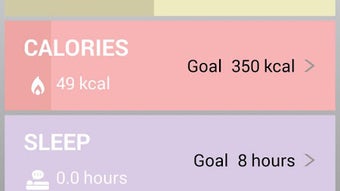
The user interface of ZeFit is designed for simplicity and accessibility, prioritizing intuitive navigation and clear data presentation. Core metrics such as steps, calories, and sleep are displayed prominently on the home screen, allowing users to quickly assess their daily status. Menus are organized in a logical hierarchy, with dedicated sections for goals, history, and coaching.
The workflow follows a linear pattern: data sync → dashboard view → goal tracking → analytics review. This structure reduces cognitive load and supports efficient daily use. The app responds promptly to user inputs, with minimal lag during navigation and data updates.
However, exact performance details were not specified by the developer. The app’s resource usage behavior, including CPU and RAM consumption, remains undocumented. Stability appears consistent based on general software behavior patterns, though no formal crash reports or reliability metrics were provided.
The developer did not specify whether background processes are optimized for battery efficiency.
Compatibility & System Requirements
ZeFit is compatible with Android devices and requires version 2.2.0 of the application. The installation package is 12.3 MB in size, indicating a lightweight footprint suitable for most Android smartphones. The app is designed to work exclusively with the MyKronoz ZeFit connected watchband, meaning hardware compatibility is limited to this specific device.
The developer did not specify minimum Android OS versions, required Bluetooth versions, or additional hardware prerequisites. Exact system requirements were not listed, and compatibility with older or newer Android models remains unconfirmed. Users are advised to ensure their device supports Bluetooth Low Energy (BLE) for proper synchronization with the watchband.
The app’s functionality depends on the presence of the paired hardware, and standalone use without the watchband is not supported.
Pros and Cons
Pros
- Seamless integration with the MyKronoz ZeFit watchband for real-time tracking.
- Free to download and use, with no upfront cost for core features.
- Intuitive interface with clear visualizations of activity and sleep data.
- Supports personalized goal setting and motivational coaching.
- Automatic wireless data sync reduces manual input and enhances consistency.
- Compact file size (12.3 MB) ensures minimal storage impact.
Cons
- Exclusive Android platform support limits accessibility for iOS users.
- Requires a specific hardware device (ZeFit watchband) to function fully.
- No information on battery optimization or background performance.
- Limited system requirements details may hinder compatibility verification.
- Offline functionality is not described, potentially restricting use without internet or device pairing.
FAQ Section
Is ZeFit available for iOS devices?
ZeFit is designed exclusively for Android users and is not currently available on iOS platforms.
Does ZeFit require a specific watchband to function?
Yes, ZeFit is built to work exclusively with the MyKronoz ZeFit connected watchband. The app cannot operate independently without the paired hardware.
Is the app free to use?
Yes, ZeFit is available at no cost. The app is free to download and use, with no in-app purchases or subscription fees mentioned.
How often does the app sync data with the watchband?
Data sync occurs automatically via Bluetooth when the devices are within range. The frequency of syncs depends on the watchband’s settings and connection stability.
Can I use ZeFit without an internet connection?
While the app may store data locally, full functionality—such as cloud backup, coaching updates, and detailed analytics—requires an internet connection. Offline usage is limited to basic data retention.
Final Thoughts
ZeFit offers a focused, user-friendly experience for Android users committed to tracking their daily activity and sleep patterns. Its seamless integration with the MyKronoz ZeFit watchband delivers consistent, real-time insights without requiring complex setup. The app’s lightweight design and free access make it accessible to a broad audience.
While platform exclusivity and hardware dependency are notable limitations, the app excels in delivering core fitness and wellness tracking features with minimal friction. For individuals already invested in the MyKronoz ecosystem or seeking a simple, dedicated health companion, ZeFit is a reliable choice. The combination of goal setting, coaching, and analytics supports long-term habit formation.
Download ZeFit now to start monitoring your health journey with confidence.






.png)
